Delivering modern apps securely in AWS often requires placing critical resources inside private subnets — for example, EC2 app servers, Lambda functions, or RDS databases.
But here’s the challenge:
These resources can’t directly access the internet.
And yet, they often need outbound connectivity (e.g., downloading packages, calling third-party APIs).
This blog explains how we solved that problem at scale using NAT Gateway.
The Problem
Private Subnet Isolation
By design, private subnets cannot route traffic to the Internet Gateway.
EC2 or Lambda inside them had no internet access.
Broken External Calls
Direct IGW Not an Option
Step 1 — Introducing NAT Gateway
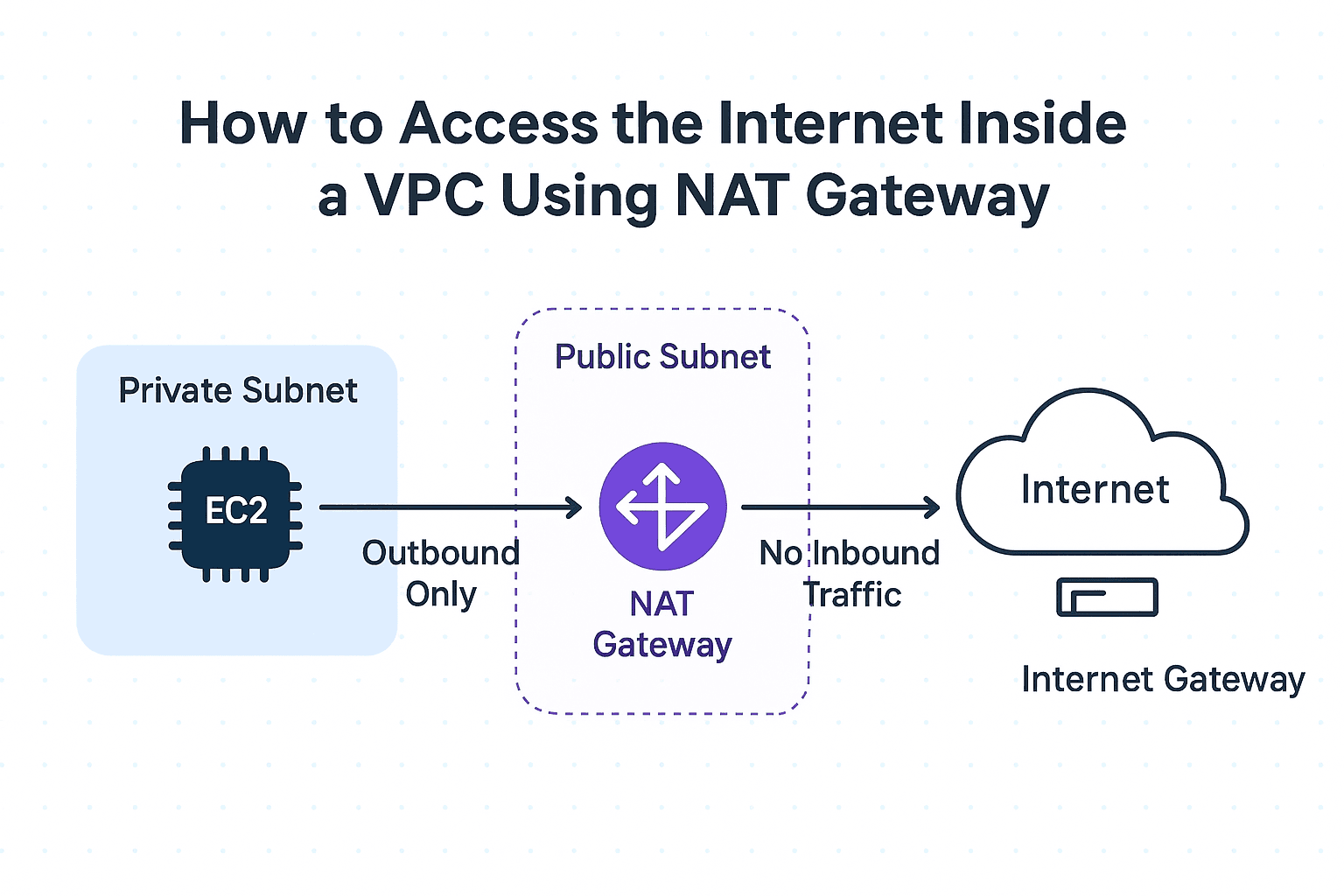
We deployed a NAT Gateway in the public subnet of our VPC.
Private subnet instances send traffic → NAT Gateway → Internet.
Inbound traffic from the internet is blocked.
Step 2 — Updating Private Subnet Route Tables
For each private subnet, we updated the route table:
This gave private resources outbound internet access while keeping them hidden.
Step 3 — Testing with EC2 in Private Subnet
We launched an EC2 in the private subnet and verified connectivity:
ping google.com
sudo yum update -y
curl https://api.github.com
Outbound requests succeeded.
Inbound requests from internet were blocked — exactly what we wanted.
Final Architecture Diagram
                   +-----------------------+
                   |       Internet        |
                   +-----------+-----------+
                               |
                        (Internet Gateway)
                               |
                   +-----------+-----------+
                   |       Public Subnet   |
                   |  NAT Gateway + EIP    |
                   +-----------+-----------+
                               |
                    Route to NAT Gateway
                               |
                   +-----------+-----------+
                   |      Private Subnet   |
                   |  EC2 / Lambda / RDS   |
                   +-----------------------+
Conclusion
By introducing a NAT Gateway, we achieved:
Secure isolation: Private subnets remain unreachable from the internet.
Controlled outbound: Instances can fetch updates, call APIs, or access S3.
Scalability: Fully managed by AWS (no manual patching or scaling).
Today, our workloads run inside private subnets with:
Private, low-latency access to databases inside the VPC.
Outbound internet connectivity for external APIs via NAT Gateway.
This simple design pattern is a must-know for any AWS-based architecture where you want security + flexibility.